Send your first line
Nothing below reaches VRChat until you have been through Set up OSC.
Turn on the clock
- On the Integrations page, switch on the Time row.
- Turn on DESKTOP, VR, or both beside it.

Time covers what else the clock can do.
Check Send to VRChat
Send to VRChat sits at the top right, above the Running readout. It is the master switch for everything MagicChatbox sends.
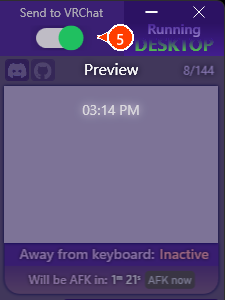
The clock then appears under Preview, further down the same column.
If Preview stays empty, see the Your chatbox is empty page. If Preview looks right but your chatbox does not, see the VRChat shows nothing page.
Turn integrations on and off does the same for every other row.