Media progress bar
A progress bar sits in your MediaLink line and shows how far through the song you are.
Turn the bar on
-
Select Options.
-
Expand MediaLink options and scroll to Media progress bar.
-
Set Seekbar Style to Custom. Nothing below it exists until you do.
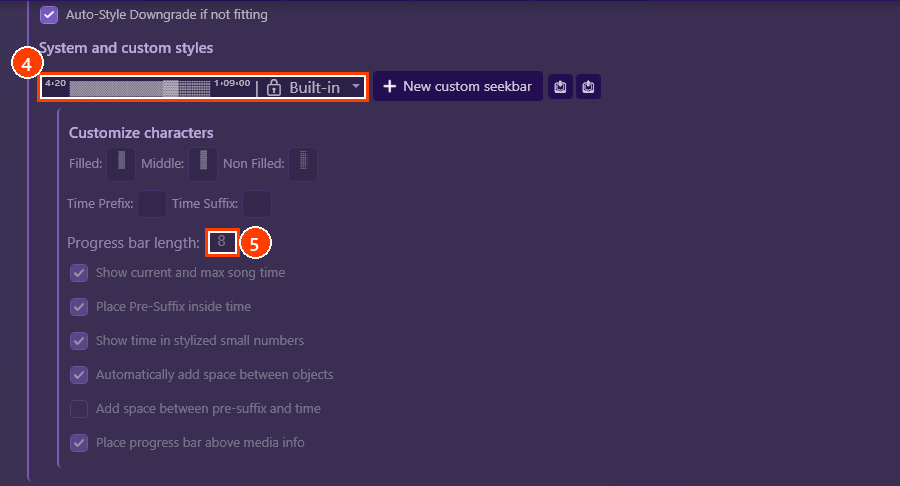 The style picker previews the bar it will produce, times included.
The other two choices: None turns the bar off, Small numbers shows just the times.
Built-in styles are locked
Every style in System and custom styles is marked Built-in with a padlock, so none of them can be altered, and the settings under the picker are greyed out along with them. The exception is Auto-Style Downgrade if not fitting, which stays usable and sits above System and custom styles rather than with the rest.
New custom seekbar, the button under the styles, starts one of your own. Two small buttons at the end of that row import and export custom styles as files.
Fine-tune the display
The pre-suffix is the pair of characters you set in Time Prefix: and Time Suffix:, which the app draws around the times.
| Setting | What it does |
|---|---|
| Show current and max song time | Shows both times, not just the bar |
| Place Pre-Suffix inside time | Moves those two characters inside the time instead of outside it |
| Show time in stylized small numbers | Draws the times in the small raised style |
| Automatically add space between objects | Spaces the bar away from the text |
| Add space between pre-suffix and time | Adds a space where those two characters meet the times |
| Place progress bar above media info | Puts the bar on the line above the track |
| Auto-Style Downgrade if not fitting | Falls back to a simpler style when a long track name leaves no room |