Add 💬 as prefix for the personal status
Two settings in Status options decide what sits in front of your personal status.
Use the speech bubble
- Select Options.
- Expand Status options.
- Select Add 💬 as prefix for the personal status.
A speech bubble now sits in front of your status text.
Use your own emoji instead
-
Select Enable custom prefix icon shuffle.
-
Type your emoji into the upper box, separated by a space or a comma. Or, to build the set one emoji at a time instead, type a single emoji in the small box beside Add emoji to cycle and select the button.
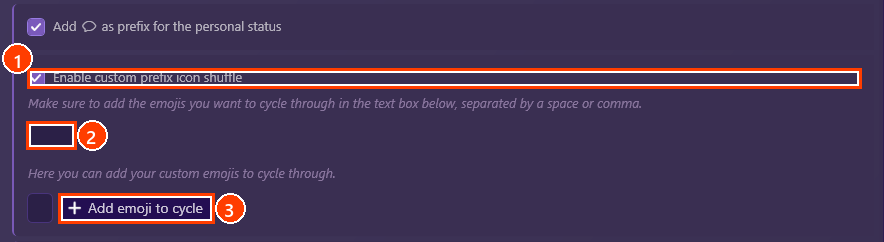
Nothing in front of your status changes until that upper box has emoji in it. From then on, MagicChatbox draws a fresh one from the set each time it rebuilds your line, and you can edit the box to drop an emoji or reorder them.
You write the statuses these icons sit in front of on the Status page.