OpenAI options
Each AI helper in the chat window runs on the model you give it here.
Set a model per helper
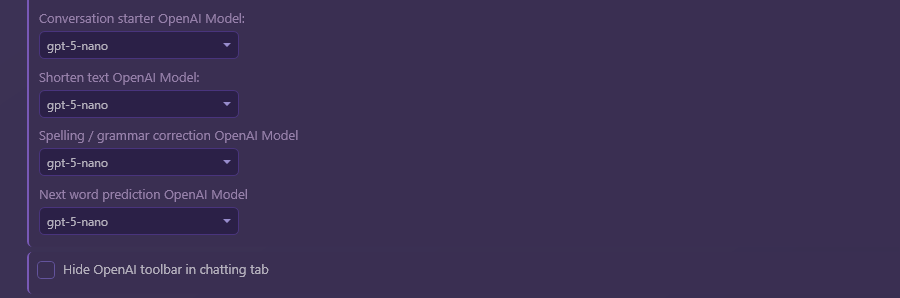 Each helper has its own list.
Four lists sit under Other AI functions:
- Conversation starter OpenAI Model:
- Shorten text OpenAI Model:
- Spelling / grammar correction OpenAI Model
- Next word prediction OpenAI Model
Magic improve and Magic translate higher up the section each have their own OpenAI Model: list as well, alongside a writing style and a language.
Suggestions in Auto complete come from a model set here too.
Give the fiddly jobs (spelling, next word) the smallest model you are happy with. They run often and the difference adds up.
Magic improve and Magic translate
Magic improve rewrites a message in a style you choose, and Select your preferred writing style for the quick-access button in the chat window below sets which style the button uses.
Magic translate works the same way with a language instead of a style.
Moderation
Enable free moderation checks to safeguard your content and OpenAI account sits directly under the connect button and is on to begin with. Leave it on.
Speech to text
Speech to text turns your voice into a message. Pick your microphone from the recording device list and a transcription model to do the listening. Enable translation works with the Whisper model only.
The rest of the group decides when the app treats you as finished talking. Type the pause length into the box between Disable after and milliseconds of silence: 1000 is a full second. Sent Speech to text after silence, the checkbox under it, sends the message once you go quiet. And Adjust the noise gate threshold, a slider from 0 to 1, sets how loud a sound has to be to count as speech rather than background noise.
Hide the toolbar
Hide OpenAI toolbar in chatting tab at the foot of the section removes the AI buttons from the chat window.
Connecting
Connect with OpenAI at the top of the section starts the sign-in.
These models run outside your PC, so they need the Internet Access permission. Check it under Privacy & permissions.