Network statistics options
The Network ˢᵗᵃᵗˢ integration has nine settings behind it, seven of which each add a figure to your line. Pick the two or three that matter to you, because two figures already cost a third of the 144-character limit.
Show your live speeds
-
Select Options.
-
Expand Network statistics options.
-
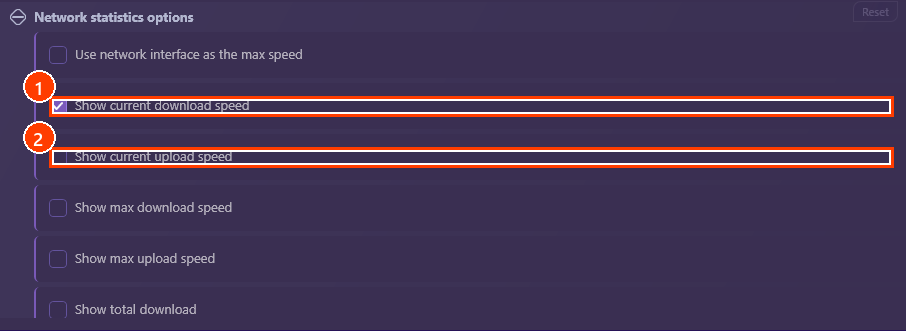
Select Show current download speed.
-
Select Show current upload speed.
The other seven
| Setting | What it adds |
|---|---|
| Show max download speed | The highest download figure seen this session |
| Show max upload speed | The highest upload figure seen this session |
| Show total download | How much you have pulled down since the app started |
| Show total upload | How much you have sent |
| Show network utilization | How hard your connection is working, as a percentage |
| Use network interface as the max speed | Measures utilization against your adapter's rated speed |
| Stylized characters | Draws the readings in the small superscript style used elsewhere |
Show network utilization gives you a percentage whether or not Use network interface as the max speed is on.