Pulsoid heart rate options
Expand Pulsoid heart rate options on the Options page to shape the number in your chatbox, the statistics around it, and the values sent to your avatar.
The number itself
Two settings sit above everything else:
- Show prefix icon in front of the heart rate puts a heart before the reading.
- Auto change heart rate prefix icons cycles through different heart symbols each time the reading updates.
Statistics over time
Enable Pulsoid ˢᵗᵃᵗˢ adds figures collected over a period you choose from the timeframe list.
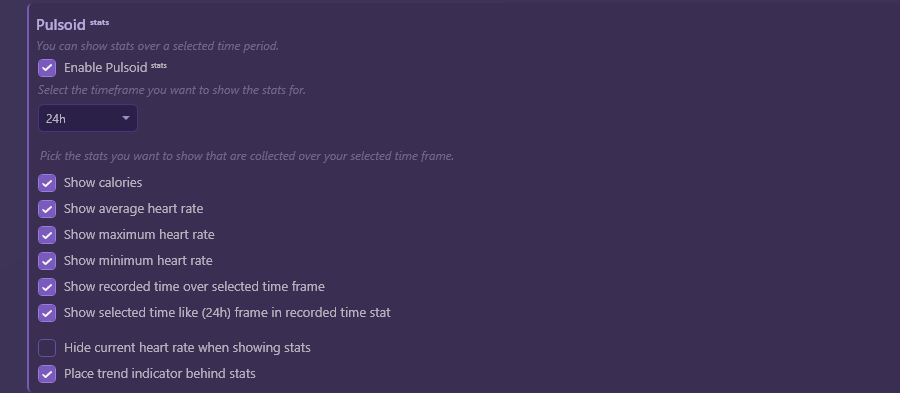 The list above the checkboxes sets the window the statistics cover.
| Setting | What it adds |
|---|---|
| Show calories | Calories over the window |
| Show average heart rate | Your average across the window |
| Show maximum heart rate | The peak it reached |
| Show minimum heart rate | The lowest it dropped to |
| Show recorded time over selected time frame | How much of the window was recorded |
| Show selected time like (24h) frame in recorded time stat | Labels that figure with the window it covers |
| Hide current heart rate when showing stats | Drops the live number and keeps only the summary |
| Place trend indicator behind stats | Moves the up-or-down arrow to the end |
Sending the reading to your avatar instead of the chatbox
Pulsoid to OSC sends your heart rate to your VRChat avatar.
- Enable OSC support turns the whole thing on.
- Send magic info to OSC, like trend indicator and max, min, avg heart rate.
- Smooth heart rate to OSC averages the last few readings, with a box for how many.
Steady the reading
Three settings stop the number jumping about:
- Smooth heart rate to Chatbox averages the reading over a few seconds.
- Trend suffix indicators ⤴️ ⤵️ adds an arrow when your rate changes quickly, with Trend symbols, a scan count, and a Trend sensitivity slider from Quick to Slow.
- Enable Heart Rate Throttling squeezes readings above your maximum into a narrower range.
Words instead of numbers
Show temperature status swaps in a word at each end of the range: sleepy below 60 BPM, say, and hot above 100. Both numbers and both words are yours to set.
Connecting
Connect with Pulsoid at the top of the section starts the sign-in, and Manual web authorization below it is the fallback.