TikTok options
Open Options and the TikTok options section covers two independent things: a follower count read from your public profile, and a live connector that listens to a room while you are streaming.
Show your follower count
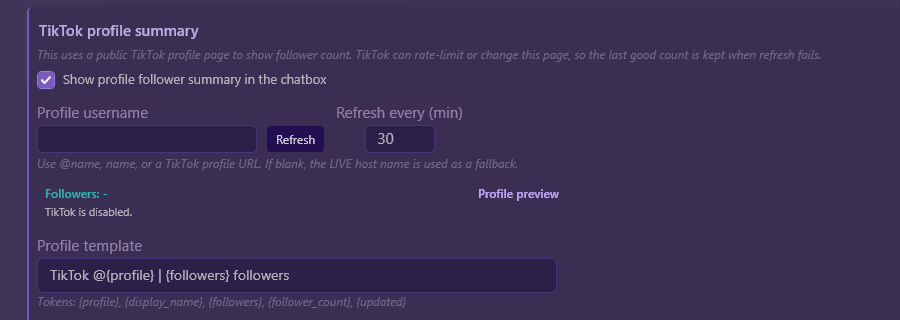 The profile summary works from a public profile page, with no sign-in involved.
Three controls carry the whole feature: Show profile follower summary in the chatbox turns it on, Profile username says whose count to read, and Refresh every (min) sets how often.
Profile username takes an @name, a plain name, or a link to the profile. Left blank, it uses the LIVE host name instead.
Profile template builds the line. Write it the way you want it to read, and mark every value you want with a placeholder; the ones it takes are listed underneath. Profile preview beside the follower readout shows what you will get.
If the count looks stale, a refresh failed and the last good one is being kept. TikTok limits how often the page can be read.
Announce new followers
Show follower-count increase alerts posts a message when the number goes up. It has a template of its own, and Show alert for sets how many seconds it stays.
The alert says how many followers arrived, never who they were: TikTok does not give the names.
Combine the two outputs
In Profile + LIVE output order, Combine Profile and LIVE output when both are available puts the two in one line, with Order and Separator deciding how. Turn it off and LIVE replaces Profile while you are live.
The LIVE connector
Turn on Enable LIVE connector only when you want MagicChatbox to join a live room and follow what happens there.