Tracker battery manager
Tracker battery manager puts the charge level of your headset, controllers, and trackers into your chatbox, so you get a warning before a controller dies mid-session.
Head to Options to find the section. Scan Devices at the top of it looks for your hardware.
Build the message
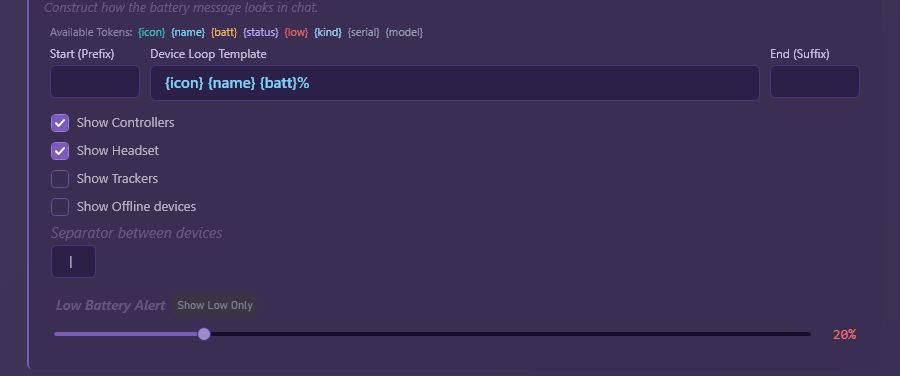
Start (Prefix) and End (Suffix) wrap the whole message. Device Loop Template repeats once per device: write a single entry, using a placeholder to hold the spot where a name or charge goes. A list of what it accepts sits above the box.
Separator between devices goes between each repeat.
Choose which devices count
Show Controllers, Show Headset, and Show Trackers each switch one class of hardware on or off. Show Offline devices includes gear that is not currently connected.
Warn before something dies
Low Battery Alert is a percentage slider, and Show Low Only beside it keeps only the devices below that level.
Long lists
Advanced Behavior & Text Overrides exists for people with a lot of trackers:
- Sort Order arranges the devices.
- Max Entries caps how many are listed.
- Max Length (Chars, 0 = no limit) caps the whole line.
- Rotate if text too long cycles through the devices instead of truncating.
Custom Status Text below it overrides the wording for Online State, Offline State, Offline Battery, and Low Battery Tag.