A row shows nothing
The small text beside an integration's name says what the row is waiting for. Switch the row on before you read it: a row that is off reports its own switch instead.
Read the row, then fix what it names
-
Select Integrations, switch the row on, and read the status beside its name.
-
Supply what it asks for: Spotify reads Connect Spotify until the account is linked.
-
Check Preview. A service waiting on you can put its own prompt into your chatbox line.
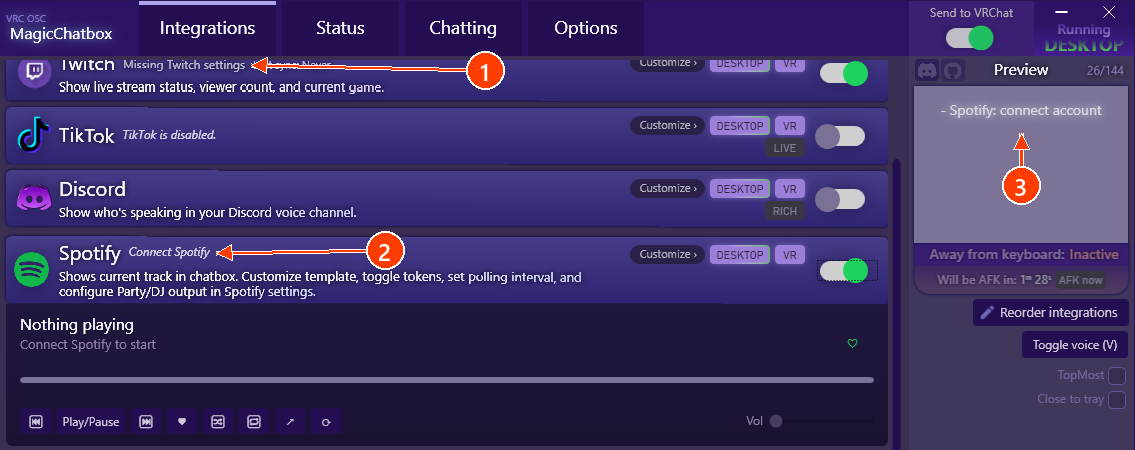 With Spotify switched on but not connected, Preview shows
- Spotify: connect accountinstead of a track.
What each status means
| Row | Status it shows | What it is waiting for |
|---|---|---|
| Pulsoid Heart Rate | No device connected | A heart-rate monitor publishing to Pulsoid |
| VRChat Radar | Not in a world | VRChat running and in a world |
| Soundpad | Soundpad is not running., with a sad-face icon | Soundpad open on the same PC |
| Twitch | Missing Twitch settings, then Last sync: Never | Channel details filled in |
| Spotify | Connect Spotify | The account linked |
| VR gear battery | Active devices, 0/0 connected, Last scan: Never | Controllers or trackers awake |
Component ˢᵗᵃᵗˢ shows no status. Under its name sit the parts of your PC it can report instead.
When the row says nothing at all
Rows such as Discord, Window activity and Time carry a description but no status line. A row producing nothing with no explanation is usually the switch, DESKTOP or the master switch.
Some integrations also need permission first. Options → Privacy & permissions lists every one and whether you have approved it.