Your chatbox is empty
Preview, in the column down the right of the window, shows the line MagicChatbox is sending. A
blank box and 0/144 mean nothing you have switched on is producing anything.
Work down the row
-
Select Integrations and turn on the switch at the right end of the row.
-
Turn on DESKTOP so the line shows while you are at your desk.
-
Watch the counter beside Preview. It climbs the moment a line lands.
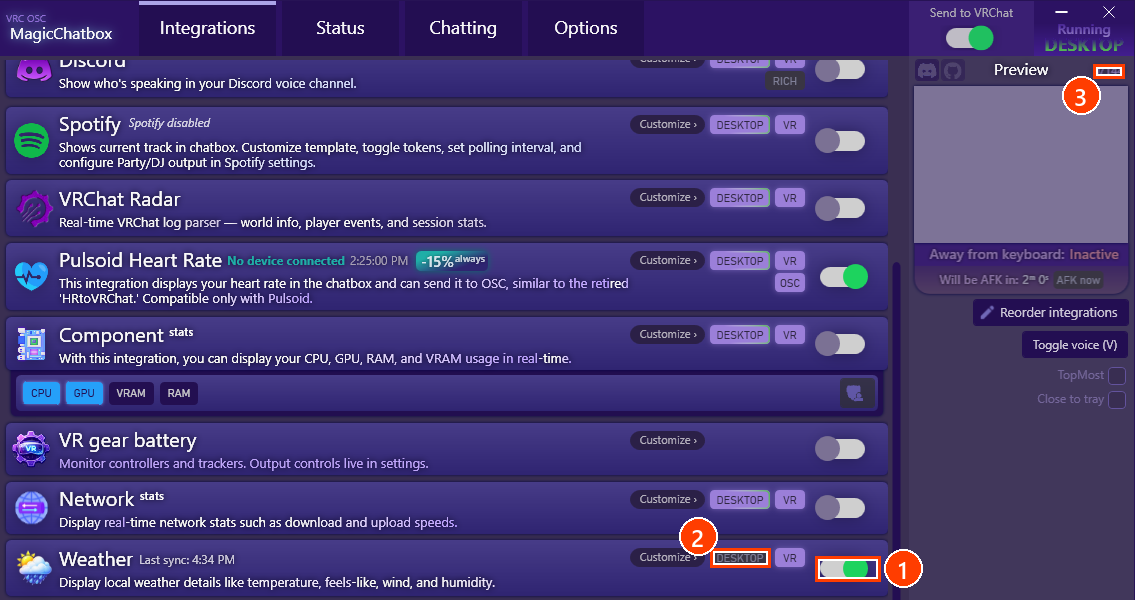 The Weather switch is on, DESKTOP is off, and the counter is stuck at
0/144.
A green switch with DESKTOP off produces nothing
Weather above has VR on and DESKTOP off. Its switch is green, and Preview stays
empty at 0/144. Turn DESKTOP on and the temperature appears.
DESKTOP and VR are set per row, and rows do not all arrive set the same way, so any row can be sitting like this. VR alone gives you nothing at a desk; both off gives you nothing anywhere.
Check the master switch
Send to VRChat, at the top right above Preview, is the master switch for everything MagicChatbox sends. Check it before you go hunting through rows.
The row has nothing to say yet
A switch that is on does not promise a line. Pulsoid Heart Rate with no device connected says so beside its name: see A row shows nothing.
If Preview has a line in it and only the row you wanted is missing, it was dropped for space: see Lines dropped from your chatbox.