Lines dropped from your chatbox
Rows that used to show up have gone quiet while you changed nothing about them: the 144-character limit makes MagicChatbox drop whole rows to make the line fit. The switches stay green. The rows go grey.
Find the rows that were dropped
-
Look down Integrations for a row that has faded while its switch is still on.
-
Check the rows near it. More than one goes at a time.
-
Turn one of them off, and the rest come back.
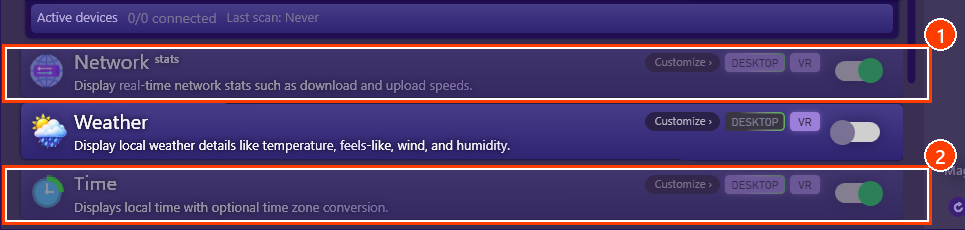 Network ˢᵗᵃᵗˢ and Time have both faded, either side of a Weather row that survived.
The counter beside Preview confirms it: it stops climbing well short of 144 and stays there.
Getting more into the line
- Turn off a row you can live without.
- Shorten what a row sends. Component ˢᵗᵃᵗˢ grows with every one of CPU, GPU, VRAM and RAM you tick.
- Keep any message you type short. It shares the same 144 characters.
The order rows are dropped in is fixed: Time goes first, then rows such as Network ˢᵗᵃᵗˢ, Component ˢᵗᵃᵗˢ and Window activity, with Personal status last to go. What you can change is which rows are switched on. Reordering moves where a row's text sits in the line, not whether the row survives.