VRChat shows nothing
MagicChatbox sends and stops there, so Preview is the furthest the app can prove anything.
Check the MagicChatbox side first
- Check that the master switch, Send to VRChat, at the top right is on.
- Read Preview. The line sitting there is the one MagicChatbox is putting out.
If Preview is blank, the problem is on this side and VRChat is not involved yet. See Your chatbox is empty, which works down from that switch.
VRChat also has to have OSC turned on. That setting lives inside VRChat, not here; Set up OSC covers it.
If Preview is right and VRChat is still empty
Start with the other apps you have open. Two of them sending to VRChat at once will fight over the chatbox, so close anything else that talks to it over OSC before you change any setting below.
The address and port MagicChatbox sends to are in Options → App options, as Local IP address and Port (outgoing). Both have a Default button that puts the value back.
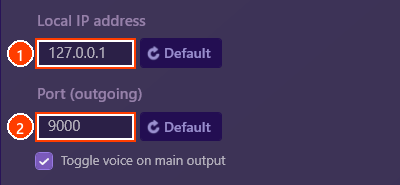 Both fields sit low in App options.
- VRChat on this PC
- VRChat on a second PC
- VRChat on a Quest
Change these only if you know why. Nothing leaves the machine, so there is no firewall rule to add.
Sending to another machine is a second output rather than a change to the fields above.
Check that its firewall allows the port you typed, and that the address matches the machine VRChat is running on. Confirm the main output works first: a line that never leaves this machine will not reach the second either.
Local IP address has to hold the headset's address rather than 127.0.0.1, and the headset has
to be on the same Wi-Fi network as this PC. An address that was right yesterday may not be today.
Set up OSC walks it.
If chat messages time out
Messages you send from the Chatting page have their own delay setting: see Live edit chats.
What the app will not tell you
- It does not check whether VRChat is running.
- MagicChatbox only sends, and nothing comes back. There is no delivery confirmation to look for, and nothing on this PC's firewall to change.
Past that, the answer is in VRChat's own settings. If you have been through those too, Report a problem is the place to take it, with what you have already ruled out.